Building Trail Spark: How AI and Serverless Built a Resilient EV Road Trip App
  1. Blog/

Building Trail Spark: How AI and Serverless Built a Resilient EV Road Trip App

Building Trail Spark: How AI and Serverless Built a Resilient EV Road Trip App
#

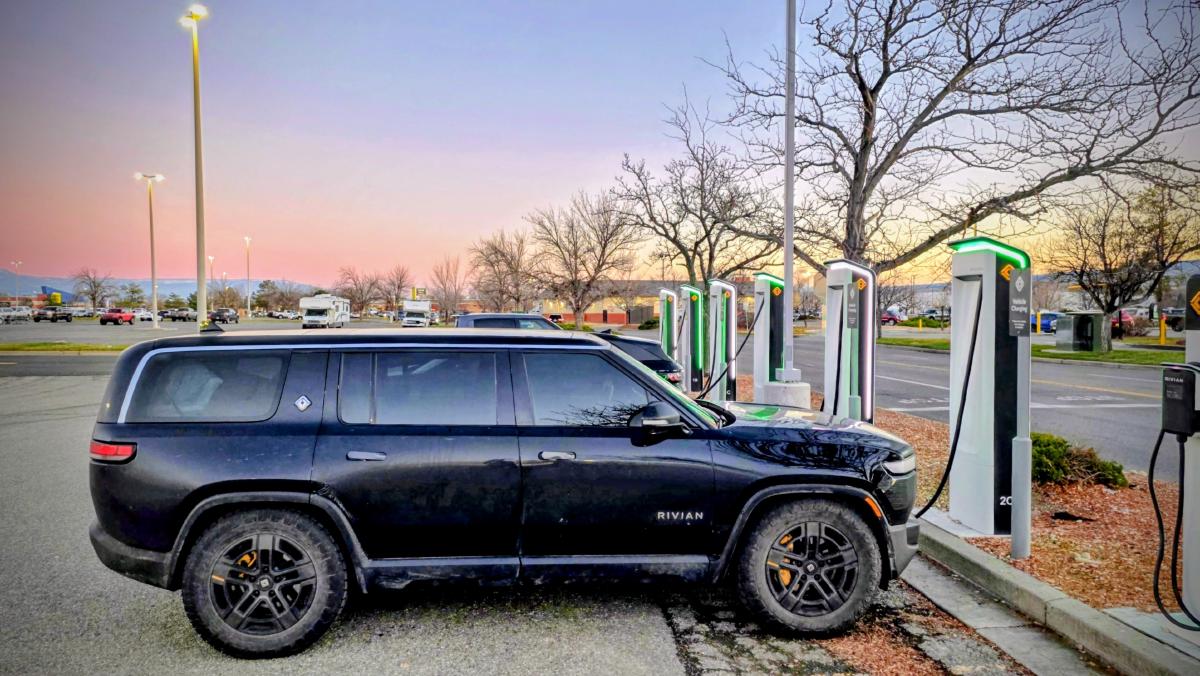
Every great EV road trip is a journey of discovery. Last November, my partner, our golden doodle Korra, and I drove our Rivian R1S from the Seattle area to Denver, Colorado. 3,000 miles. Three mountain passes. Zero gas. I took 225 photos and thought: I should build something to show this trip the way it felt, not the way Instagram would flatten it.

That impulse turned into Trail Spark—my hobby platform dedicated to EV road trip documentation and sharing. But there was a catch: I do not code full-time at work anymore, and between professional and family life, I hardly have any time to sit down and write code at home. Furthermore, since I work in cloud engineering, building this on AWS serverless tech was very much a case of eating my own dogfood.

In this first post of my engineering blog, I want to talk about how I built a highly resilient, secure, and production-ready serverless system on AWS—and how the entire project was made possible through a partnership with AI coding assistants.


🤖 The Engine: How AI Made a Hobby Project Possible
#

In the past, building a full-stack web application as a side project was a daunting multi-month commitment. You had to set up the boilerplate, configure routing, write custom image metadata parsers, manage IAM roles, design database schemas, configure CORS, write test suites, and troubleshoot CDN deployment issues. For a hobbyist with only a few spare hours a week, projects usually died in the bootstrap phase.

Trail Spark exists today because I partnered with AI:

  • Cursor allowed me to iterate quickly on the frontend React components and prototype pages.
  • Claude Code acted as a CLI co-pilot, orchestrating infrastructure setups, preparing deployments, and running backend tests.
  • Antigravity helped me deep-dive into complex debugging loops—like tracing why CloudFront was throwing WAF 403 blocks, calculating rolling 5-minute IP rate limits, and implementing in-place WebACL updates.

By delegating the boilerplate, configuration syntax, and debugging loops to AI, I could focus entirely on system design and product flow. Instead of writing code, my role shifted to that of an architect: defining goals, reviewing plans, and making high-level architectural decisions.


📋 The Blueprint: Product Specifications & Claude’s Role
#

Before writing any architecture or code, establishing clear boundaries for the MVP was critical. I used Claude to draft and refine the Product Requirements Document (PRD) for Trail Spark, defining a phased roadmap focused on core features: a chronological, location-aware road trip timeline sorted automatically by time and location (with a media lightbox, narrative description editing, and coordinates linking to Google Maps), public read-only trip URLs for easy sharing, secure DynamoDB persistence, and an AWS SAM serverless backend with CloudFront/S3 hosting.


🏗️ Architectural Decisions: Why Serverless and SAM?
#

For a hobby project, operation and maintenance overhead must be near zero. I don’t want to wake up to a crashed server, manage container patches, or pay for idle virtual machines.

This constraint drove my core architectural decisions:

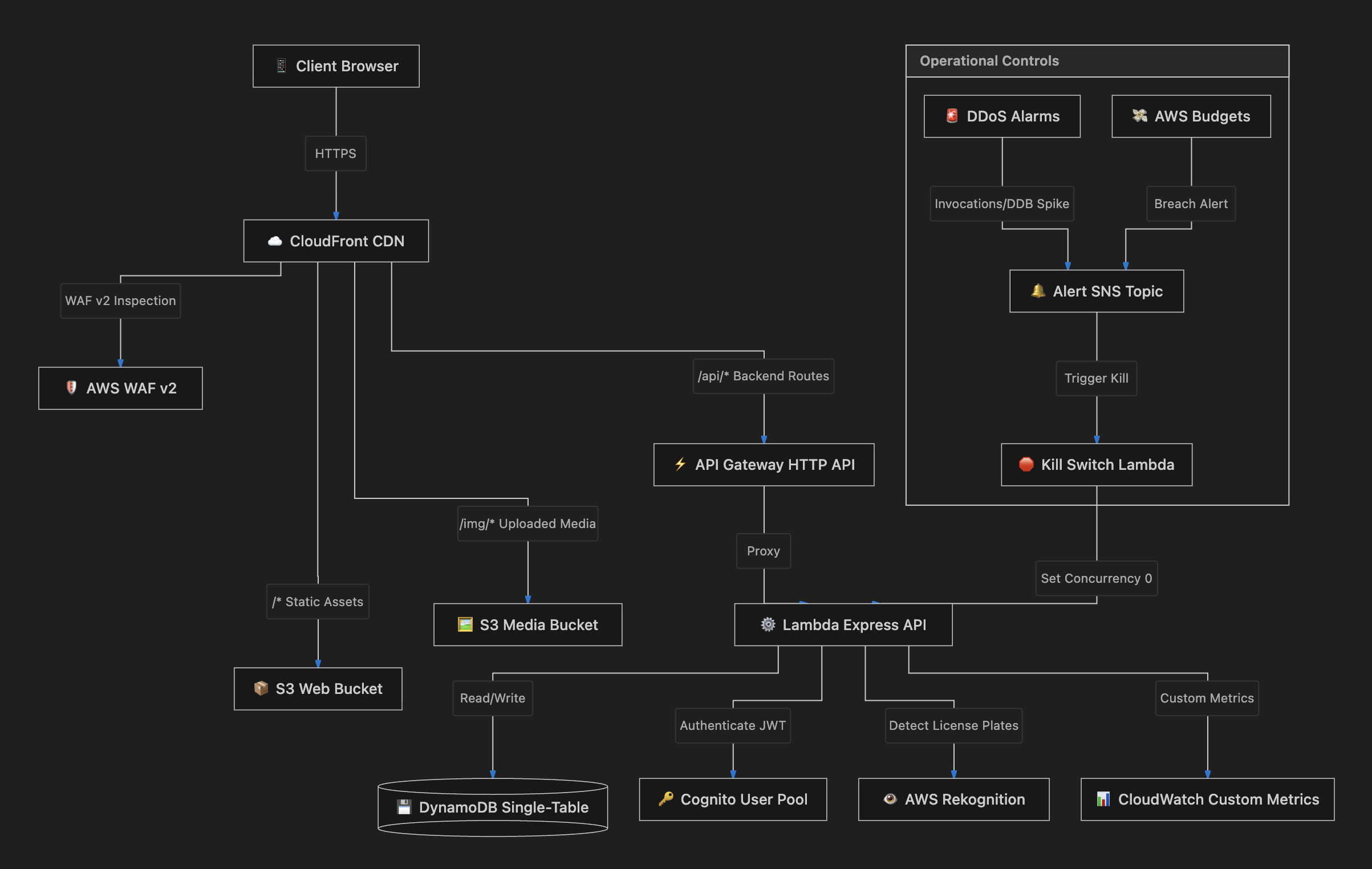
Trail Spark serverless architecture on AWS — CloudFront, WAF, API Gateway, Lambda, DynamoDB, with Budgets/CloudWatch alarms triggering the Kill Switch Lambda

1. The Monolithic Server: One to Rule Them All
#

Instead of splitting the app into multiple microservices, the backend is a single monolithic Express server (~2,300 lines of code) that handles auth, trips, timelines, blog posts, image uploads, engagement, and admin invite codes.

  • The Reason: When building alone, the cost of microservices is the overhead of multiple deployment pipelines, service discovery, and complex distributed tracing. Keeping it monolithic means everything shares the same client instances, middleware configurations, and error handlers.
  • The Serverless Bridge: The Express app exports cleanly for Lambda using @vendia/serverless-express—a thin adapter translating API Gateway HTTP events into standard Express requests. The production handler is only 6 lines, and the exact same codebase runs locally via node server.js for seamless development.

2. S3 + CloudFront with Origin Access Control (OAC)
#

The frontend is a React SPA hosted in an S3 bucket. However, the bucket is completely blocked from public access. Instead, traffic must go through CloudFront.

  • The Reason: CloudFront acts as a global CDN, caching assets at edge locations close to users for fast load times. By enforcing Origin Access Control (OAC), I ensure that S3 content is only accessible via signed CloudFront requests, preventing direct S3 access and protecting against data scraping and unexpected S3 download bandwidth bills.

3. DynamoDB Single-Table Design
#

Instead of setting up a relational SQL database that requires connection pooling, server provisioning, and maintenance, I designed a single DynamoDB table. All entities—users, trips, milestones, charging data, and blog posts—coexist in the same table, indexed using composite primary keys:

USER#<userId>       + SK: PROFILE            → user profile (bio, vehicle)
USER#<userId>       + SK: POST#<tripId>      → trip summary & metadata
POST#<tripId>       + SK: META               → detailed trip timeline config
POST#<tripId>       + SK: MS#<order>#<id>    → specific timeline milestone
POST#<tripId>       + SK: IMG#<id>#<index>   → image mapped to a milestone
POST#<tripId>       + SK: CHARGE#<order>#<id>→ charging log record
USER#<userId>       + SK: BOOKMARK#<id>      → user saved post reference
  • The Reason: DynamoDB has zero maintenance overhead, scales instantly, and costs nothing when there is no traffic (fitting entirely in the free tier). Single-Table design allows me to fetch a complete road trip—metadata, stops, images, and charging data—in a single Query operation on PK = POST#<tripId>, avoiding database joins and multiple round-trips.

💥 Lessons from the Edge: Tracing the Silent Failures
#

Building serverless systems on the AWS edge introduces unique integration challenges. Two debugging stories stand out:

1. The WAF That Ate My Blog Posts
#

Initially, users could create trips, but writing blog posts containing HTML in the rich-text editor (TipTap) triggered a "Network error: Unexpected token '<'" and crashed the React app.

Here is the chain of events I had to trace:

  1. The rich text editor sends request bodies containing HTML: { body: "<p>My <strong>blog</strong> post</p>" }
  2. AWS WAF’s AWSManagedRulesCommonRuleSet flags the request via its CrossSiteScripting_BODY rule and blocks it with a 403 Forbidden.
  3. CloudFront’s custom error configuration converts the 403 response into a 200 OK serving the React SPA’s index.html (standard for client-side routing fallback).
  4. The React frontend parses the HTML page where it expects a JSON response, leading to the crashing syntax error.
  • The Fix: I updated deploy.sh to configure WAF in-place and exclude the CrossSiteScripting_BODY rule from the managed rule group, since our blog editor is supposed to accept HTML. I also adjusted CloudFront to only apply SPA redirects to 404s, letting 403 errors surface properly to the API layer.

2. Native Binaries on Lambda: The Sharp Dilemma
#

To generate high-performance image timelines, the backend converts iPhone HEIC files to JPEGs and resizes thumbnails via sharp.

  • The problem: sharp relies on a native library (libvips). The binary compiled on my local macOS environment fails on Lambda’s Graviton2 ARM64 Amazon Linux runtime.
  • The Fix: I wrote a lazy-loading mechanism. When the server boots, it runs a native dependency check. If sharp fails to load (e.g. during a mismatched local runtime test), the app falls back to writing the raw image buffer. The uploads still succeed, ensuring the application remains robust.

🛡️ The Billing Breaker: Andon Cord & Budget Kill-Switch
#

For a personal hobby project, a primary concern was AWS budget overruns. A sudden surge in traffic—or a malicious DDoS attack—could scale a serverless application instantly, potentially racking up thousands of dollars in usage bills.

To prevent this, I implemented two defensive layers:

1. Multi-Tier Rate Limiting & Scope-Downs
#

I configured WAF edge limits to block automated scrapers. However, a timeline with 225 photos loads them in parallel, which instantly tripped our strict edge limit of 100 requests per 5 minutes.

To fix this without compromising protection, I added a WAF Scope-Down Statement using the base64-encoded representation of /img/ (L2ltZy8=):

  • Excluded the /img/* prefix from the strict RateLimit100Per5Min API rule.
  • Created a separate RateLimit2000ImgPer5Min rule targeting only /img/* to allow media loads while keeping defenses against DDoS flood attacks.

2. The Andon Cord
#

Taking inspiration from Toyota’s manufacturing line, I built an automated Andon Cord.

If AWS Budgets detects that my $10/month cap is breached, or if CloudWatch registers a DDoS-like invocation surge, an SNS alert triggers the Kill Switch Lambda. This Lambda instantly overrides the reserved concurrency of my Express API Lambda to 0:

aws lambda put-function-concurrency \
  --function-name trail-spark-api-prod \
  --reserved-concurrent-executions 0

This acts as a physical breaker, taking the API offline instantly to prevent billing overruns. I also built a CLI tool (./andon-cord.sh) to check status:

./andon-cord.sh status
# State: ONLINE (unrestricted)
# Concurrency: Account Limit (default)

⛑️ Observability & Monitoring: An Engineering Approach
#

As a developer, I know first-hand that you cannot manage what you do not measure. Observability and monitoring are not optional add-ons; they are core architectural requirements. For a self-hosted hobby project on AWS, we need minimal operational overhead, budget safety, and fast troubleshooting.

I structured our observability stack into four key pillars:

  1. Unified Dashboard (TrailSpark-BotTraffic): A 30-panel CloudWatch Dashboard tracking client traffic (CloudFront edge latency and cache hit ratios), compute health (API Gateway times, Lambda execution percentiles and error rates), data persistence (DynamoDB read/write capacity and latency), and security (WAF total, blocked, allowed, and bot traffic).
  2. Operational Alarms: Automated CloudWatch Alarms notifying me via an SNS Alerts Topic for elevated Lambda errors (trail-spark-lambda-errors), near-concurrency limits (trail-spark-lambda-throttles), API Gateway 5xx faults (trail-spark-api-5xx), and DynamoDB read/write throttling (trail-spark-dynamo-throttle).
  3. Automated Resilience (The Andon Cord): If CloudWatch registers a DDoS-like traffic surge—such as Lambda invocations exceeding 500/min or DynamoDB read/write capacity spiking—or if AWS Budgets detects our $10/month cap is breached, an SNS alert automatically triggers our Kill-Switch Lambda. This Lambda overrides the Express API’s reserved concurrency to 0, acting as a physical circuit breaker to take the API offline instantly and prevent runway billing.
  4. Logging & Privacy Auditing: We stream WAF logs continuously to CloudWatch Logs (aws-waf-logs-trail-spark-prod) with a 30-day retention policy to facilitate rate-limit tuning, and track AWS Rekognition metrics to monitor the dynamic license plate blurring pipeline during media uploads.

🧪 Validating the System: Gameday Testing
#

Because AI built these resilience systems, I needed a way to prove they work under real-world stress. I created a test script called gameday.sh that simulates live attacks and budget breaches directly against the production environment.

The gameday suite runs 12 automated scenarios, including publishing mock budget alerts, simulating DDoS spikes to trigger the Andon Cord, and launching concurrent request bursts to test WAF rate limiting. Running the suite verifies that all circuit breakers trip, notify, and recover successfully—giving me peace of mind that my pocketbook is safe.


🚀 What’s Next?
#

With the backend secured and the infrastructure automated, I am currently focusing on:

  • Dynamic License Plate Blurring: Using AWS Rekognition to detect license plates in uploaded trip images and processing them dynamically using Sharp to preserve privacy.
  • SPA Optimization: Migrating my frontend React app from Create React App to Vite to streamline local development and build times.
  • Beta Sharing: Inviting other Rivian and EV road-trippers to start mapping and documenting their adventures.

Stay tuned for my next post, where I will dive deep into the math behind spatial milestone grouping using EXIF geo-coordinates!


I am a developer who builds things for the EV community. I drive a Rivian R1S, travel with my golden doodle Korra, and have strong opinions about charging station coffee.

Related